

Home renovation budget template
Plan what each part of the job should cost, keep a cushion for surprises, and fill in what you actually pay as bills come in. Start from a kitchen or bathroom priced by our calculators, or from a blank list.
Renovation budget spreadsheet
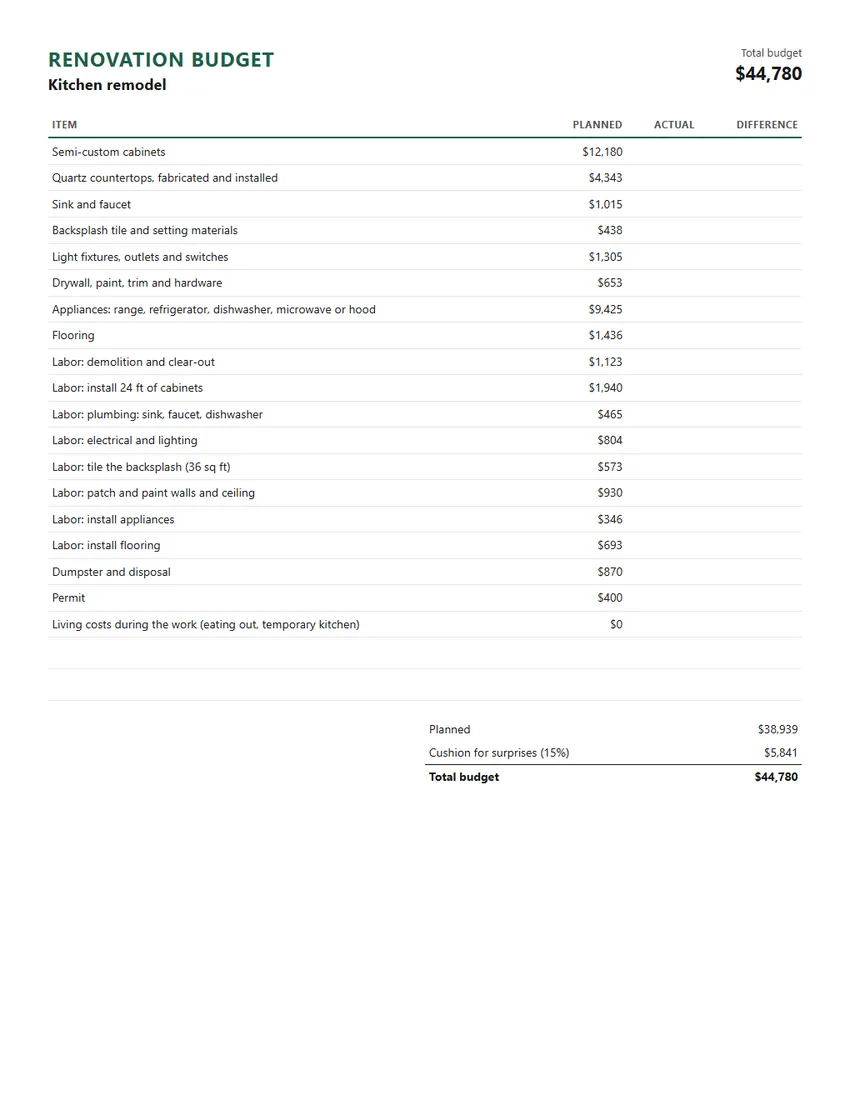
Filled in with a mid-range kitchen remodel from our cost calculator: 19 lines, a 15% cushion and a total budget of $44,780. The Excel version works out the totals, differences and cushion left as you type.
- Download Excel .xlsx, 9 KB
- Download Word .docx, 11 KB
- Download PDF .pdf, 48 KB
Fill it in online and save it as a PDF; nothing leaves your browser
Plan your budget online
Your budget
Renovation budget
Kitchen remodel
| Item | Planned | Actual | Difference |
|---|---|---|---|
| Semi-custom cabinets | $12,180 | ||
| Quartz countertops, fabricated and installed | $4,343 | ||
| Sink and faucet | $1,015 | ||
| Backsplash tile and setting materials | $438 | ||
| Light fixtures, outlets and switches | $1,305 | ||
| Drywall, paint, trim and hardware | $653 | ||
| Appliances: range, refrigerator, dishwasher, microwave or hood | $9,425 | ||
| Flooring | $1,436 | ||
| Labor: demolition and clear-out | $1,123 | ||
| Labor: install 24 ft of cabinets | $1,940 | ||
| Labor: plumbing: sink, faucet, dishwasher | $465 | ||
| Labor: electrical and lighting | $804 | ||
| Labor: tile the backsplash (36 sq ft) | $573 | ||
| Labor: patch and paint walls and ceiling | $930 | ||
| Labor: install appliances | $346 | ||
| Labor: install flooring | $693 | ||
| Dumpster and disposal | $870 | ||
| Permit | $400 | ||
| Living costs during the work (eating out, temporary kitchen) | $0 |
| Planned | $38,939 |
| Cushion for surprises (15%) | $5,841 |
| Total budget | $44,780 |
How to use it
- List every cost: the contractor’s price broken into its parts, anything you’re buying yourself, permits, and living costs during the work.
- Fill in “Planned” from your quotes, or from our kitchen and bathroom cost calculators before you have quotes.
- Set the cushion, then check the total budget is money you can actually spend.
- Fill in “Actual” as each bill is paid. The difference column shows where you’re over, and the summary shows how much cushion is left and where the whole job is heading.
- Record changes as they happen, with a signed change order for each one, and add them as new lines.
Costs people forget
- Permits, inspections and any drawings the permit needs.
- Things you buy yourself: appliances, light fixtures, faucets, tile, paint.
- Delivery, haul-away and dumpster fees.
- Eating out or a temporary kitchen, and storage for furniture.
- Fixing what the work uncovers in an older home: rot, old wiring or plumbing, water damage.
- Small extras that add up: outlet covers, door hardware, caulk, touch-up paint.
Common questions
How do I set a renovation budget?
Start from what the work really costs where you live: price it with a cost calculator, then get at least three written quotes for the same scope. Add the things quotes leave out, such as items you’re buying yourself and living costs during the work, then add a cushion for surprises. Decide how you’ll pay for it before you sign anything.
How big should the cushion be?
Many remodeling guides suggest 10 to 20% of the planned cost, and more in an older home, where hidden problems such as rot, old wiring or water damage are more likely. Keep it for genuine surprises rather than upgrades.
What’s the difference between “planned” and “actual”?
Planned is what you expect to pay, from your quotes or our calculator. Actual is what it really cost, once the bill or invoice comes in. The sheet compares the two line by line and shows how much of your cushion is left.
Does the Excel version work in Google Sheets?
Yes. Upload the .xlsx file to Google Drive and open it with Google Sheets; the formulas and formatting carry across. It also opens in Apple Numbers and LibreOffice.
Is my budget saved?
Only in your own browser on this device, so you can come back and fill in actual costs as bills arrive. Nothing you type is sent to us or stored on a server. Clearing your browser data removes it.
Related
- Kitchen remodel checklist and bathroom remodel checklist
- Punch list template for the final walk-through
- Kitchen remodel cost calculator
- Bathroom remodel cost calculator
Sources and method
- This Old House, Small Bathroom Remodel Cost (updated June 2026): set aside 10–20% for unexpected expenses
- Kitchen and bathroom starting figures: our cost calculators at national average prices . Item prices and labor hours are our own estimates; see how we estimate
Built by Engr. Zakir Ullah, an engineer and Google-certified data analyst. Full method: how we estimate. Last reviewed .